Deploying a static site in Canada with Worktree and Codeberg
Earlier this year, I migrated my static sites off of Vercel and on to a VPS in Europe. At $5 CAD per month after exchange, it isn’t a bad deal, but I’ve also been paying attention to the Canadian scene to see what products are coming to market that might help small businesses or bloggers. Worktree has been on my radar since interviewing Alex, and I was excited to play around with their latest cloud offering. Here, I’ll walk through what it took to get a static site up and running, along with some pros and cons about the service in its current form.
What is Worktree
Worktree is primarily a soft-fork of Gitea that launched in 2024, seeking to provide a git forge for businesses and individuals. It includes a free plan for git remote hosting. Their new cloud offering currently offers two products: static site hosting, and a CDN network.
The journey to host a static site on Worktree cloud
You don’t need to host your code within a Worktree repository in order to host your site with Worktree. The two primary ways to send your content to the site are from the wtc command-line tool, and from a CI/CD pipeline through an action. I am not sure how easy it is to translate the github-compatible action with Woodpecker (the CI platform Codeberg uses), but I do know from deploying to vercel from codeberg that it is possible to deploy using the wtc command line tool within a CI/CD pipeline!
Command line deployment tool general configuration
Use this option if you are looking to deploy straight from the command-line. To download and install the wtc tool, you can run something like this, assuming $HOME/.local/bin is on your $PATH.[1]
mkdir -p "$HOME/.local/bin" && \
curl -L "https://worktree.ca/worktree/cli/releases/download/v1.0.2/wtc_1.0.2_linux_amd64.tar.gz" \
     -o "/tmp/wtc.tar.gz" && \
tar -xzf "/tmp/wtc.tar.gz" -C "$HOME/.local/bin" && \
rm "/tmp/wtc.tar.gz"
This step could be easier, but since the project is so new, it makes sense that it hasn’t been packaged for anything except homebrew.
Next, the wtc command expects a configuration file, or for you to provide some values through flags when you run it. The configuration file lives in a sensible location .config/worktree/cli.yaml, and looks something like this:
profiles:
  default:
    public_key: your-default-public-key
    secret_key: your-default-secret-key
    region: qc-south-1
The public and private key are obtained from the cloud console, and are generated like any other API key (visible when first created, and can be set with an expiry). These credentials basically link wtc with your account, and allow you to deploy to sites. Down the line, it looks like storage buckets will be supported as that product category comes out of beta.
Repository specific configuration
Next, each repository can have a configuration file to save you from having to enter flags when deploying. These configuration files look something like this, placed in .worktree/deploy.yaml within the repository itself.
type: static-site
siteID: <your_site_id>
siteSource: ./dist
All of these settings make sense. Worktree needs to know which site to deploy to, and which directory that information lives in. The siteID is obtained from the cloud console.
Once configured, you just run wtc deploy and your static site will be uploaded to the worktree cloud (available on a subdomain of worktree.site by default). My one critique of this process is that is was surprisingly slow. I use deploy scripts with rsync, and it is orders of magnitude faster to send my site contents to the VPS in Europe than to get it to Montreal through wtc.
Deploying to Worktree from Codeberg through a Woodpecker CI process
Lastly, I wanted to try to get Worktree sites integrated with the codeberg repository for this site. Using the worktree action should work, but I was pretty confident I could wire up the command-line tool in a similar way to the Vercel integration. Sure enough, it works! Below is the .woodpecker/deploy.yaml file. It does two things: builds the site using eleventy, and then deploys it to worktree cloud.
when:
  - event: push
    branch: main

steps:
  - name: build
    image: node
    commands:
      - npm install
      - npm run build
  - name: deploy
    image: debian
    environment:
      WTC_REGION: qc-south-1
      WTC_PUBLIC_KEY:
        from_secret: WTC_PUBLIC_KEY
      WTC_PRIVATE_KEY:
        from_secret: WTC_PRIVATE_KEY
    commands:
      - apt-get update && apt-get install -y curl
      - mkdir -p "$HOME/.local/bin"
      - curl -L -o /tmp/wtc.tar.gz "https://worktree.ca/worktree/cli/releases/download/v1.0.2/wtc_1.0.2_linux_amd64.tar.gz"
      - tar -xzf /tmp/wtc.tar.gz -C "$HOME/.local/bin"
      - chmod +x "$HOME/.local/bin/wtc"*
      - export PATH="$HOME/.local/bin:$PATH"
      - wtc deploy --site-id iREt2JTGpd9BtoYrBswc7Q --site-source ./_site --type static-site --public-key "$WTC_PUBLIC_KEY" --private-key "$WTC_PRIVATE_KEY"
The Worktree CDN
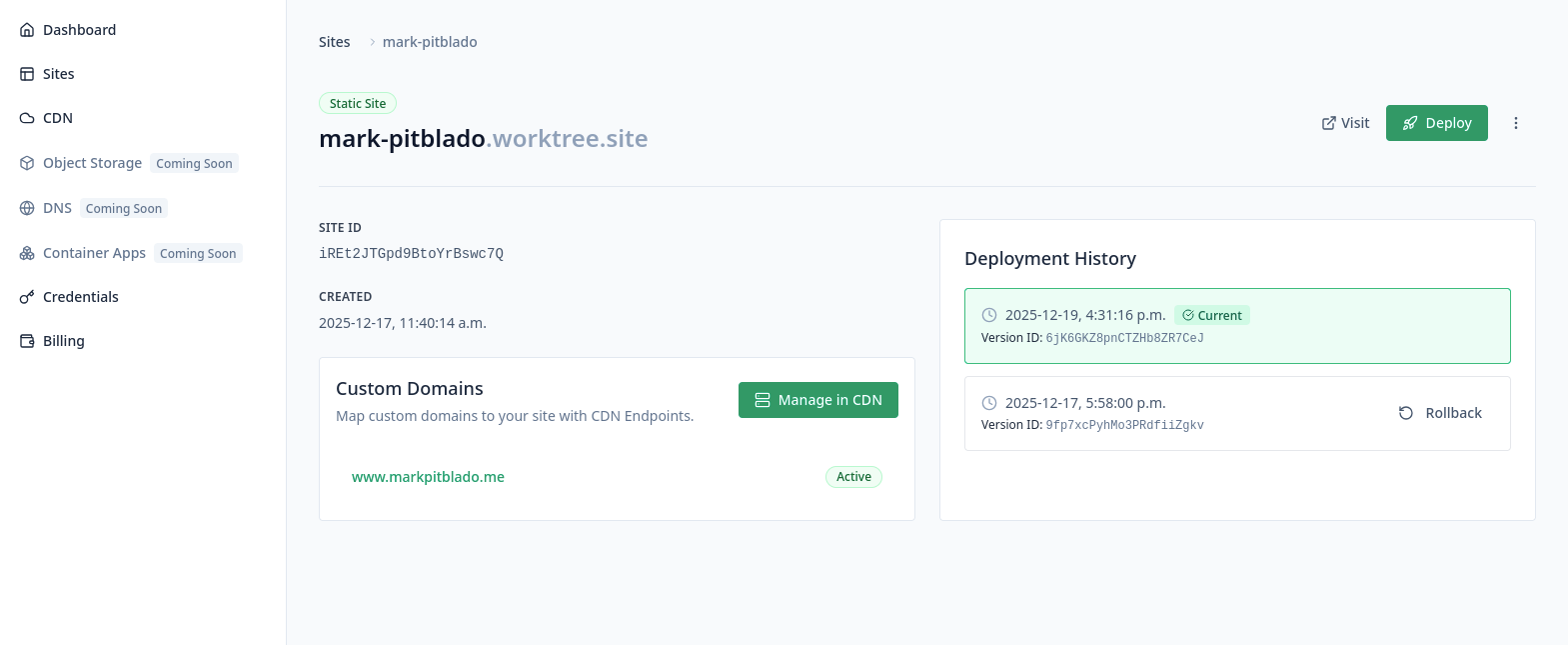
Worktree has a CDN product offering that I was also curious to try out. The configuration was simple enough, the static site comes preconfigured in a dropdown to link the CDN endpoint to (similar to something like Bunny CDN. Once configured, both the CDN endpoint and the site are accessible from one convenient dashboard.
Performance
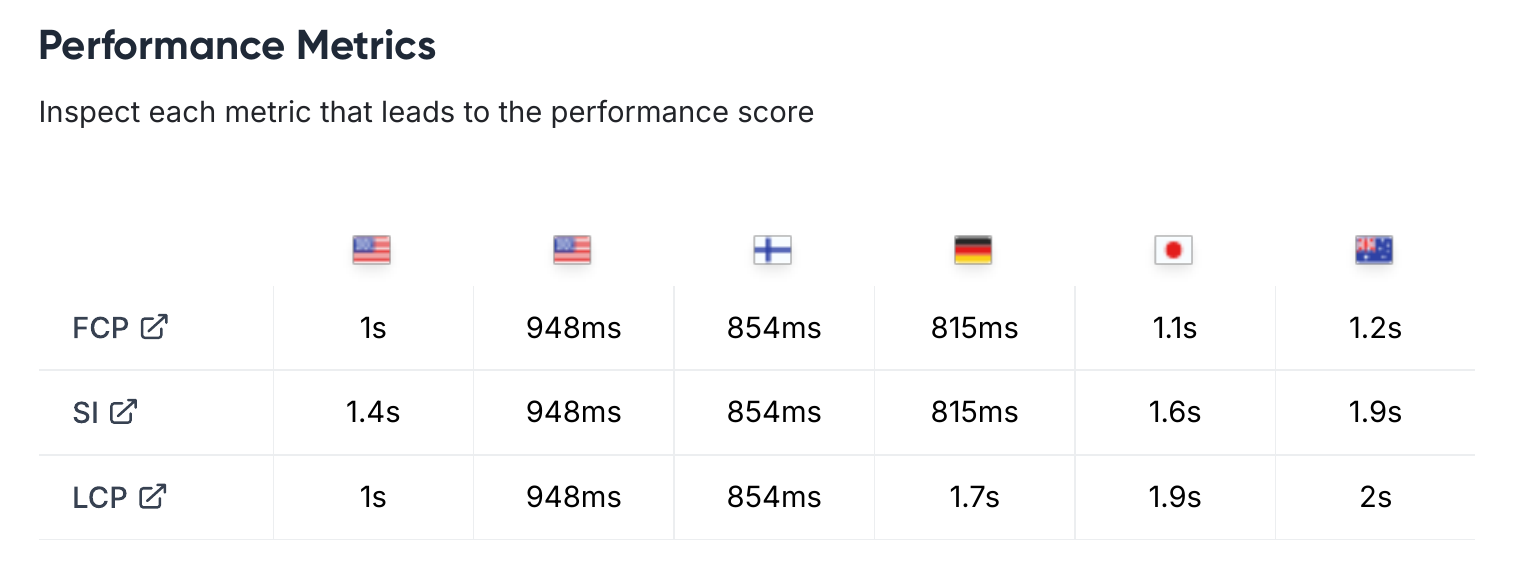
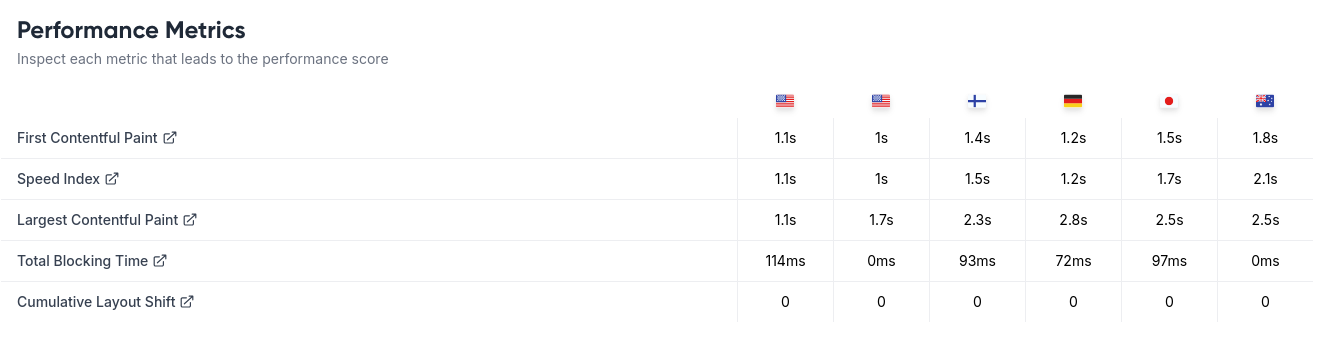
The CDN performance of Bunny seems to be slightly better internationally, based on lighthouse scores. However, I believe in Canada and the United States, Worktree CDN might be slightly faster. From my own desk here in British Columbia, the website loads much faster. I believe with Bunny it is only caching the css and favicon, not the html itself, while Worktree does cache the html.
Bunny CDN:
Worktree CDN:
Pricing
Before the transition, I was paying $5 CAD for the VPS in Switzerland, and about $1.38 for the CDN with Bunny. After the transition, I’ll probably be paying $3 CAD for the site, $4 CAD base for the CDN (one endpoint for the apex domain and one for www at $2 CAD each), and then probably another $1-2 in bandwidth. The biggest thing that will eat into your costs with Worktree is the bandwith, as it’s about 5-10x more expensive than something like Bunny (which is more expensive than something like Cloudflare, which is free for many). This doesn’t take into consideration that I’m also currently hosting nevermonetize.com on that same VPS, so I can’t get rid of it entirely.
If you were okay with using just the included subdomain, no CDN, and had a small static site, you could easily get setup for $5 CAD a month with Worktree. That’s way better than any other option that I’ve found in Canada to date. Fullhost has offered me great support in the past, however their pricing for a wordpress site is around $12.
When paying for a service like Worktree you are paying a premium for developing further capabilities in Canadian infrastructure. That work cannot happen if services like Worktree are expected to be cost competitive right out of the gate, however I am curious how pricing will evolve as the company matures.
Conclusion
I’m happy to once again have a CI/CD pipeline setup for the website, as it will allow me to publish from multiple machines more easily. My main goal in this post was to highlight that it is possible to integrate multiple services together (you don’t have to choose between Codeberg and Worktree, you can use offerings from both). Codeberg pages is a great option for those that don’t need 100% stability, and are looking for a free option. I might switch nevermonetize to that.
Canada hasn’t always had the best options for tech, and the options we do have can be expensive. I’m excited to see what the future holds both for Worktree and for other companies in the space. Open-source solutions are great, but you still need hardware or cloud offerings to host things if you aren’t running it out of your house. Cheaper options for static sites are a step in the right direction.
As a next step to make it even easier for bloggers that might not be super technical, I would love to see a drag and drop interface on the website where people could just upload their static site folder (dist, _site etc) and then have the platform take care of the rest.
P.S I didn’t receive any compensation or incentives for any companies mentioned in this post. None of the links are referral links and I hope you choose what works best for you!
Be sure to change the hyperlink as newer versions are released. ↩︎